User-Guide

Comment Plugins

This theme utilizes Gitalk.

To enable Gitalk, add the following configuration to _config.linen.yml:

_config.linen.yml
1
2
3
4
5
6
7
8
9
10
11
12
13
14
15
16
comment:
type: gitalk
client_id: ****
client_secret: ***
repo: ***
owner: ***
admin:
- ***
per_page: 20
distraction_free_mode: false
pager_direction: last
create_issue_manually: false
proxy: https://cors-anywhere.lynanbreeze.workers.dev/?url=https://github.com/login/oauth/access_token
flip_move_options: null
enable_hotkey: true
language: zh-CN

Configuration Guide

The following content is adapted from the Icarus User Guide - Comment Plugins

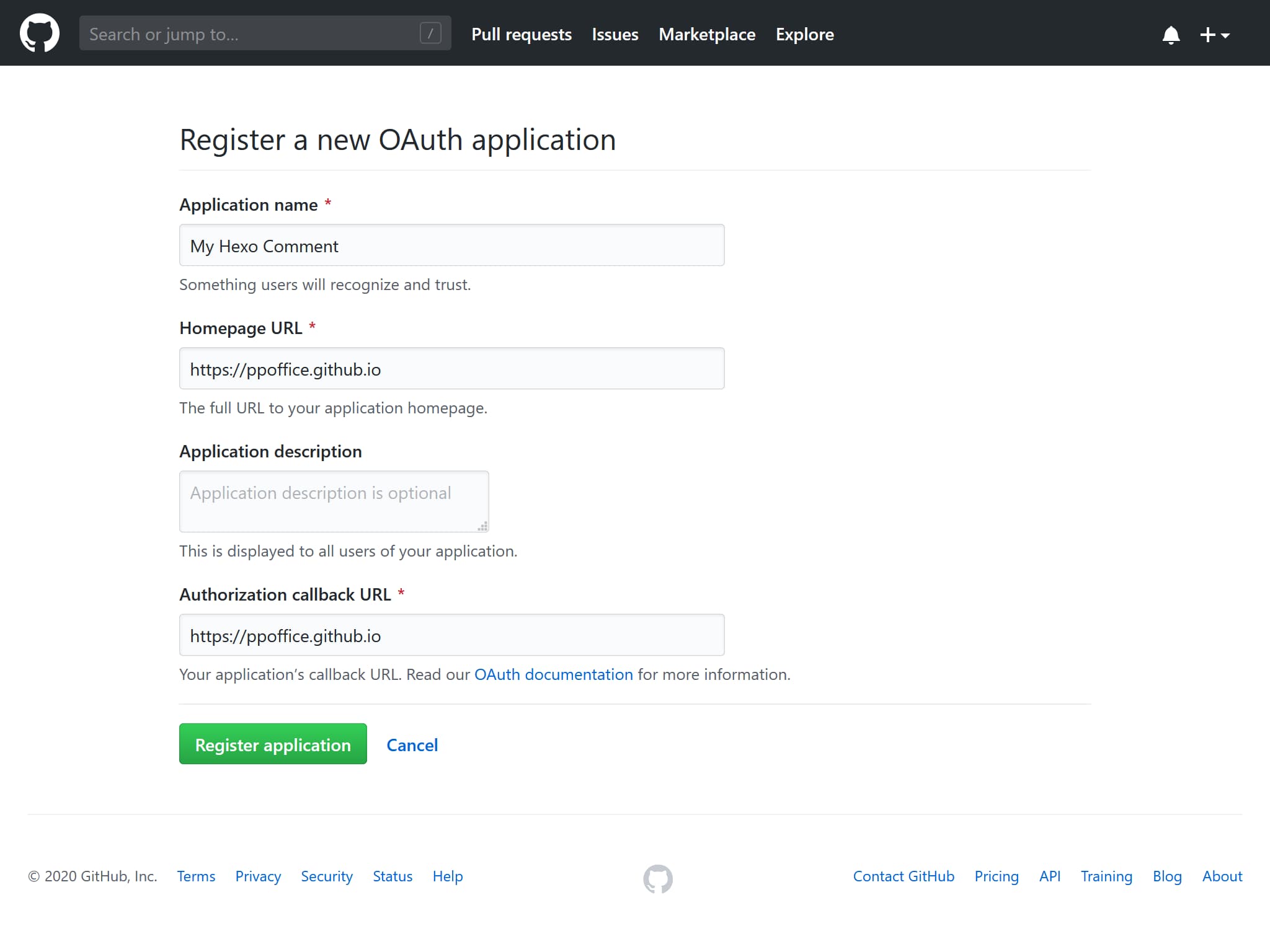
  1. Log in to GitHub and click here to register a new OAuth application. Fill in the “Application name,” “Homepage URL,” and “Application description” fields.
    Next, enter your blog’s root URL in the “Authorization callback URL” field.
    Click the “Register application” button to proceed to the application details page.
Register OAuth Application - GitHub
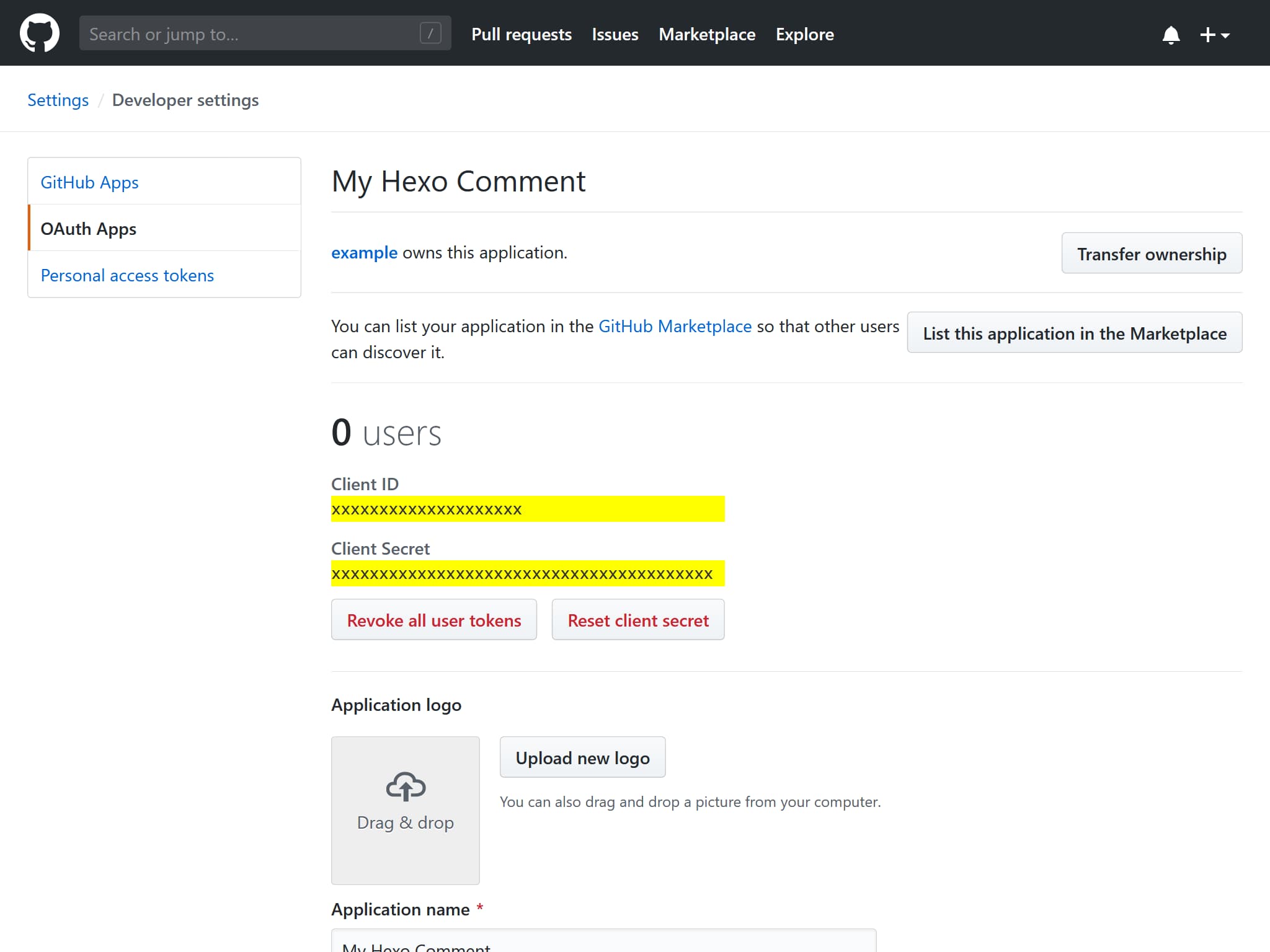
  1. Copy the values ​​for “Client ID” and “Client Secret,” and paste them into the corresponding configuration fields within your theme settings. OAuth Application Settings - GitHub" "OAuth Application Settings - GitHub

For example, given the “Client ID” and “Client Secret” shown below:

GitHub OAuth Application
1
2
3
4
Client ID
xxxxxxxxxxxxxxxxxxxx
Client Secret
xxxxxxxxxxxxxxxxxxxxxxxxxxxxxxxxxxxxxxxx

The corresponding Gitalk configuration would be as follows:

_config.linen.yml
1
2
3
4
5
6
7
8
9
10
11
12
13
14
15
16
comment:
type: gitalk
client_id: xxxxxxxxxxxxxxxxxxxx
client_secret: xxxxxxxxxxxxxxxxxxxxxxxxxxxxxxxxxxxxxxxx
repo: Some-of-Your-GitHub-Repo
owner: you_github_name
admin:
- you_github_name
per_page: 20 # Optional
distraction_free_mode: false # Optional
pager_direction: last # Optional
create_issue_manually: false # Optional
proxy: # Optional
flip_move_options: # Optional
enable_hotkey: true # Optional
language: zh-CN # Optional
  1. For details regarding the meaning and possible values ​​of the above configuration options, please refer to the Gitalk documentation or hexo-component-inferno.
1
2
3
4
5
6
7
8
9
10
11
12
13
14
15
16
17
18
19
20
21
22
23
24
25
26
27
28
29
30
31
32
33
34
35
36
37
38
39
40
41
42
43
44
45
46
47
48
49
50
51
52
53
54
55
56
57
58
59
60
61
62
63
64
65
66
67
68
69
70
71
72
73
74
75
76
77
78
79
---
title: Comment Plugins
date: 2026-03-28 23:54
cover: /img/volodymyr-hryshchenko-V5vqWC9gyEU-unsplash.jpg
coverInfo:
author: Volodymyr Hryshchenko
url: https://unsplash.com/photos/three-crumpled-yellow-papers-on-green-surface-surrounded-by-yellow-lined-papers-V5vqWC9gyEU
series: User-Guide
appendRawMarkdown: true
tocType: flat
translations: ['zh-CN']
---

This theme utilizes [Gitalk](https://github.com/gitalk/gitalk).

To enable Gitalk, add the following configuration to `_config.linen.yml`:

```yaml _config.linen.yml
comment:
type: gitalk
client_id: ****
client_secret: ***
repo: ***
owner: ***
admin:
- ***
per_page: 20
distraction_free_mode: false
pager_direction: last
create_issue_manually: false
proxy: https://cors-anywhere.lynanbreeze.workers.dev/?url=https://github.com/login/oauth/access_token
flip_move_options: null
enable_hotkey: true
language: zh-CN
```

## Configuration Guide

> The following content is adapted from the [Icarus User Guide - Comment Plugins](https://ppoffice.github.io/hexo-theme-icarus/Plugins/Comment/icarus%E7%94%A8%E6%88%B7%E6%8C%87%E5%8D%97-%E7%94%A8%E6%88%B7%E8%AF%84%E8%AE%BA%E6%8F%92%E4%BB%B6/#Gitalk)

1. Log in to GitHub and [click here to register](https://github.com/settings/applications/new) a new OAuth application. Fill in the "Application name," "Homepage URL," and "Application description" fields.
Next, enter your blog's root URL in the "Authorization callback URL" field.
Click the "Register application" button to proceed to the application details page.

<img style="max-width: 500px;" alt='Register OAuth Application - GitHub' src="/hexo-theme-linen-doc-zh-CN/img/gitalk-register-application.jpg">

2. Copy the values ​​for "Client ID" and "Client Secret," and paste them into the corresponding configuration fields within your theme settings. <img style="max-width: 500px;" alt='OAuth Application Settings - GitHub" "OAuth Application Settings - GitHub' src="/hexo-theme-linen-doc-zh-CN/img/gitalk-application-settings.jpg">

For example, given the "Client ID" and "Client Secret" shown below:

```text GitHub OAuth Application
Client ID
xxxxxxxxxxxxxxxxxxxx
Client Secret
xxxxxxxxxxxxxxxxxxxxxxxxxxxxxxxxxxxxxxxx
```

The corresponding Gitalk configuration would be as follows:

```yaml _config.linen.yml
comment:
type: gitalk
client_id: xxxxxxxxxxxxxxxxxxxx
client_secret: xxxxxxxxxxxxxxxxxxxxxxxxxxxxxxxxxxxxxxxx
repo: Some-of-Your-GitHub-Repo
owner: you_github_name
admin:
- you_github_name
per_page: 20 # Optional
distraction_free_mode: false # Optional
pager_direction: last # Optional
create_issue_manually: false # Optional
proxy: # Optional
flip_move_options: # Optional
enable_hotkey: true # Optional
language: zh-CN # Optional
```

3. For details regarding the meaning and possible values ​​of the above configuration options, please refer to the [Gitalk documentation](https://github.com/gitalk/gitalk) or [hexo-component-inferno](https://github.com/ppoffice/hexo-component-inferno/blob/0.2.1/src/schema/comment/gitalk.json).